

You’ve bought and installed Football Manager. You’ve downloaded all those graphics mods and name fixes that Sports Interactive definitely don’t want you to use. You’ve kissed your partner goodbye and fed the cat…
…and now you’ve started a brand new save and added yourself as manager of your chosen club. What’s next?
Starting a new FM save can be daunting, especially if you’re new to the series. It can feel like there are hundreds of things to do before you even get into your first match. But if you take the time to set everything up just how you want to, you can get your save off to a strong start – and possibly save time in the long run.
Using my Millwall save on Football Manager 2024, I will give you some tips on what to do on the first day of a brand-new career, before you click ‘Continue’ for the first time.
LOOK AT YOUR TEAM

Naturally, you’ll want to start off by familiarising yourself with your squad and setting up a tactic. I like to look at each of my first-team players in turn, so I have a good idea of what I’ll be working with. If my best players are wingers or inside-forwards, I probably won’t use a narrow midfield diamond as my tactic.
Also bear in mind your supporters’ expectations, which you can find under Club Culture > Supporters. Your fans might expect your team to play a certain style of football. Results should always take priority, but fulfilling the supporters’ wishes can go a long way to keeping them off your back if results don’t go your way.


Once you’ve set up a tactic, the Squad Planner can help you figure out where your players will fit in, and which areas you might be lacking in quality and/or depth. You’ll also see some star ratings, based on how your assistant manager rates each player in terms of their ability and role suitability. These stars shouldn’t always be trusted – but they can be useful guides when you’re starting out.
Another useful feature to help you analyse your squad is the Comparison screen. If you stay on the Squad Planner and go to Report > Comparison, you can see how your squad compares to the rest of your league. You can see how your players’ physical, mental and technical attributes measure up to the league average, and even filter these comparisons by position.
These can help influence what tactical style you start off with with. If your players generally have high Work Rate and Stamina, a high-pressing tactic could work well… but if their passing and creativity isn’t up to scratch, don’t go tiki-taka.

Another thing you’ll want to look at nice and early is your players’ agreed playing time. Certain players can get upset if you don’t give them as much playing time as expected or as promised. This can be a real problem if you have more than 11 players whose agreed playing time is Regular Starter or higher – my Millwall squad had 15 when I took over!
In that case, it’s a good idea to reduce certain players’ agreed playing time to something more realistic (e.g. Squad Player). More professional and/or loyal players might accept this without any fuss, but others might need more persuasion.
SORT OUT THE STAFF

After checking out your playing staff, you’ll want to look at your non-playing staff – you coaches, scouts, physios, etc.
On the Staff screen, you’ll have a summary of how many staff members you have, and how much capacity you have to recruit more. You’ll also see how your backroom compares to other teams in your division. For example, Millwall’s coaching staff is below-average across the board, if only because we only have two senior coaches (the board will allow seven).
You can have a closer look at your coaching staff by going to Training > Coaches > Edit Coach Assignments. Ask your assistant to assign coaching responsibilities, and they’ll try to fit them as best as possible.

Ideally, multiple coaches can be assigned to each category to reduce the coach workload. However, coaches will be more effective if they focus on one category, so be careful not to spread them too thin. Getting the best of both worlds won’t be possible if you can only afford a few coaches, so in that case, I would focus on keeping the workload down and giving coaches no more than three responsibilities.
I can see that my team needs a specialised Fitness Coach, and perhaps a second Goalkeeping Coach. I’ll also look for a couple of attacking and possession-based coaches… and perhaps one more to manage set-pieces, even if I can’t convince the board to employ a specialist Set-Piece Coach.
Back on the Staff screen, you can manually search for your own staff members who have the attributes and/or tactical preferences to suit your needs. If you don’t want to do that, you can place adverts for each position in the Job Centre. After about two weeks, you will (hopefully) get a list of suitable candidates who are interested in joining your club.
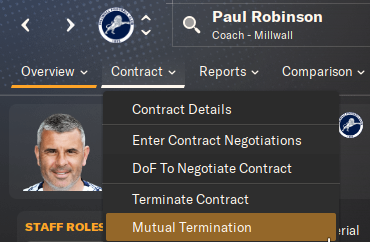 You might also find want to get rid of some staff members – perhaps because you’re over capacity, or just because they’re not good enough. Whenever you start a new job, any existing members of staff will always accept a ‘Mutual Termination’ of their contracts. This will cost your club less compensation than just terminating their contracts outright.
TAKE RESPONSIBILITY
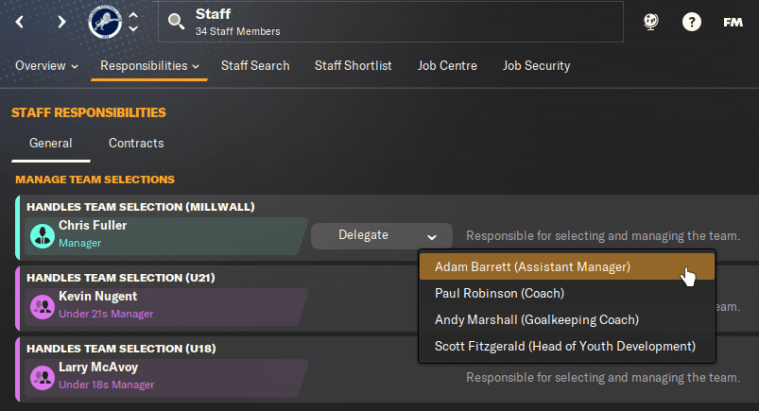
Part of the beauty of Football Manager is that you can do as much or as little as possible. Pretty much any managerial task can be delegated to another member of staff, which you can set on the Responsibilities tab of the Staff screen.
Responsibilities are split into nine categories:
- Staff: Decide who handles team selection for your senior and development teams, hiring and firing staff members, and renewing staff contracts.
- Advice and Reports: Decide which staff members give you feedback on various areas of the game.
- Scouting: Decide whether to handle scouting meetings or assign scouts manually, or leave them to your chief scout or director of football.
- Transfers and Contracts: Decide who makes offers for players, and negotiates transfers and contracts, and who confirms any transfers that have been agreed. You could take full control of first-team signings, while leaving someone else to bring in younger players.
- Media: Press interviews – you either hate them or tolerate them. If you don’t want the media wasting your time, you can ask your assistant to handle that stuff instead.
- Training: Decide who handles general and individual training for your senor and development teams.
- Tactics: Choose which staff members give you team selection advice, and whether you want to set up opposition instructions yourself.
- Match: Who’s throwing the water bottles? This is where you decide who handles touchline shouts and team talks. You can also let your assistant arrange and take charge of friendly matches if you don’t care about them.
- Set Pieces: Set-pieces have had an overhaul on FM24. If you want a specialised coach to manage set-pieces, you can do that here.
In theory, you could delegate everything to your staff, and then sit back and relax. That way, you can take all the credit if you succeed – or blame the game if it all goes wrong!
PLAN FOR PRE-SEASON
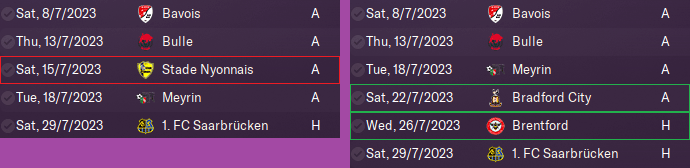
Now you’ll want to set up pre-season friendlies and training schedules. I wrote in more depth about this back in 2020, but here are some basic pointers to get you started…
Ideally, you’ll want to play anywhere between 6 and 10 friendlies. If team cohesion is low (e.g. the team has several new signings), you’ll want to play more matches to build that up faster.
You should schedule one or two friendlies per week, with a minimum three-day gap between matches. I find that a consistent schedule of Saturday and Tuesday/Wednesday matches works well. I also like a mix of away games against weaker opposition (to build up morale and attacking confidence) and home games against stronger/similar opposition (to test your defence and increase development).
If you’re managing a lower-league team, hosting lucrative friendlies against top clubs can boost your finances, but too many heavy beatings could destroy your team’s confidence. On the flip side, if you’re at a Premier League club, beating up a load of amateur teams will be great for morale, but that won’t prepare your players for tougher tests – and it can also build complacency.
FM arranges friendlies for your team while creating the game, but you can still make changes. In my example, I cancelled a match that was scheduled just two days after another fixture. I also set up friendlies away to Bradford (a step up in class after playing three weak Swiss teams) and at home to Brentford (to test us against stronger opposition). Our other home game was against Saarbrücken – a German 3rd-division team.
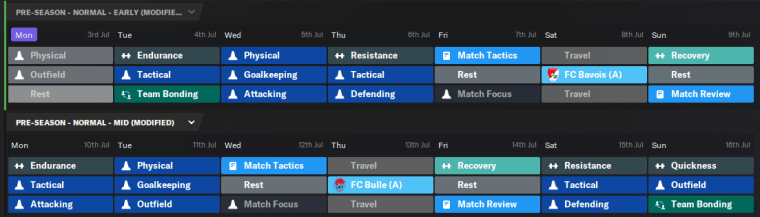
You can delegate training to your assistant manager or another coach, but if you want to take control of this yourself, there are a few guidelines you should follow in pre-season.
Before the season begins, you’ll want to focus on building up your players’ fitness and tactical familiarity. Physical training is especially important in the first two weeks of pre-season – but while you should push your players hard, don’t go overboard. I like to get by with one physical training session per day.
The general Physical training module will work on all physical attributes, and there are three specialised sessions you should use as well. Endurance improves stamina, fitness and work rate (but players won’t enjoy it), while Resistance works on power and strength, and Quickness focuses on speed and agility.
Your players will also need plenty of tactical training sessions to boost their tactical familiarity and team cohesion. Team Bonding sessions are especially useful at improving chemistry, though you can only arrange one per week.
While it is tempting to fill every training slot, don’t forget to put in rest and/or recovery sessions after a match or a high-intensity training day. You don’t want to knacker your squad before the first league game, do you?
ALL ABOUT THE DETAILS
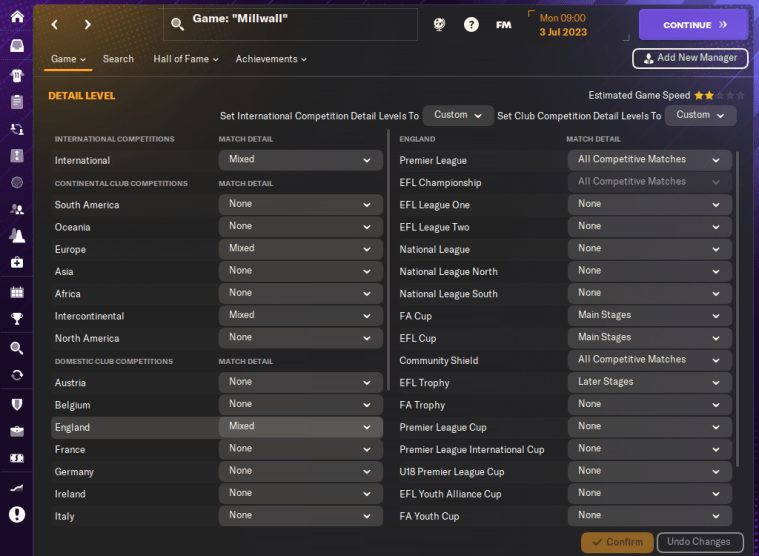
If you open up the FM menu at the top of the screen, and then click on Detail Level, you can select the match detail for every competition in your save. This will determine whether matches in these competitions are simulated in ‘full detail’ or via the ‘Quick Match Engine’ (QME).
Matches simulated in full detail will use the main match engine to generate more realistic results, though having multiple competitions on full detail will need more time and processing power. The QME is much quicker and more simplistic, mainly using squad ability and club reputation when generating results.
By default, all matches in your league will be simmed in full detail. For all other nations and competitions, you can choose whether you want All Competitive Matches, the Main Stages, or just the Later Stages simmed in full detail. If you set Match Detail to None, every match in that competition will be quick-simmed with the QME.
In my save, I like to have the Premier League on full detail, as well as the main stages of the major cup competitions. The World Cup and European Championship (and their respective qualifiers) are also simulated in full.
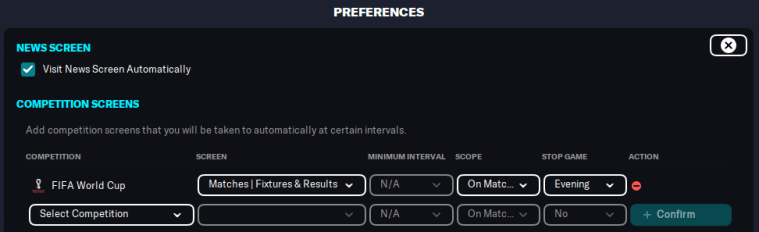
You might also want to go into your Preferences and set up Screen Flow. This will help you keep track of results and/or statistics from any major tournaments you’re interested in. Everything is explained in this guide, which I wrote for FM23.
While you’re there, you might also want to untick ‘Visit News Screen Automatically’. Unticking this will take you to your inbox by default after the game has finished processing, rather than the news or social feed screens. If you’re not bothered about those things, this can save you a little time.

Lastly, there’s the Social Feed, where you can ‘follow’ news stories from any clubs, competitions, awards, etc that you might want to know about. You can also filter how much news you receive about them.
On the Social Feed tab of your inbox, click on ‘Manage’. For each thing that you’re following, you can choose to receive minimal, normal or extensive coverage, or even set up a custom filter to specify which news messages you want (or don’t want) to receive.
If you have NO interest in the social feed (maybe you hated Twitter before Elon ruined it), you can just click ‘Remove All’. This will unfollow everything except your club – and with no need to generate any social media stuff, the game might process a little quicker.
And that is my Day 1 checklist for making a new Football Manager career run more efficiently. If there’s anything else you like to do on a new save, please let me know by dropping a comment below. You can also find me on Twitter, Threads and Bluesky.
 Fuller FM
You must be logged in to post a comment.